pet-whale 🐳
A desktop pet plugin for DeepSeek Harness (DSH), works in both the desktop app and the web UI. A small whale floats in the bottom-right corner and reacts to your agent’s state in real time.
It uses the official DeepSeek whale outline, pure DOM animations, zero runtime third-party dependencies, and WebAudio-synthesized sound effects (no audio files).
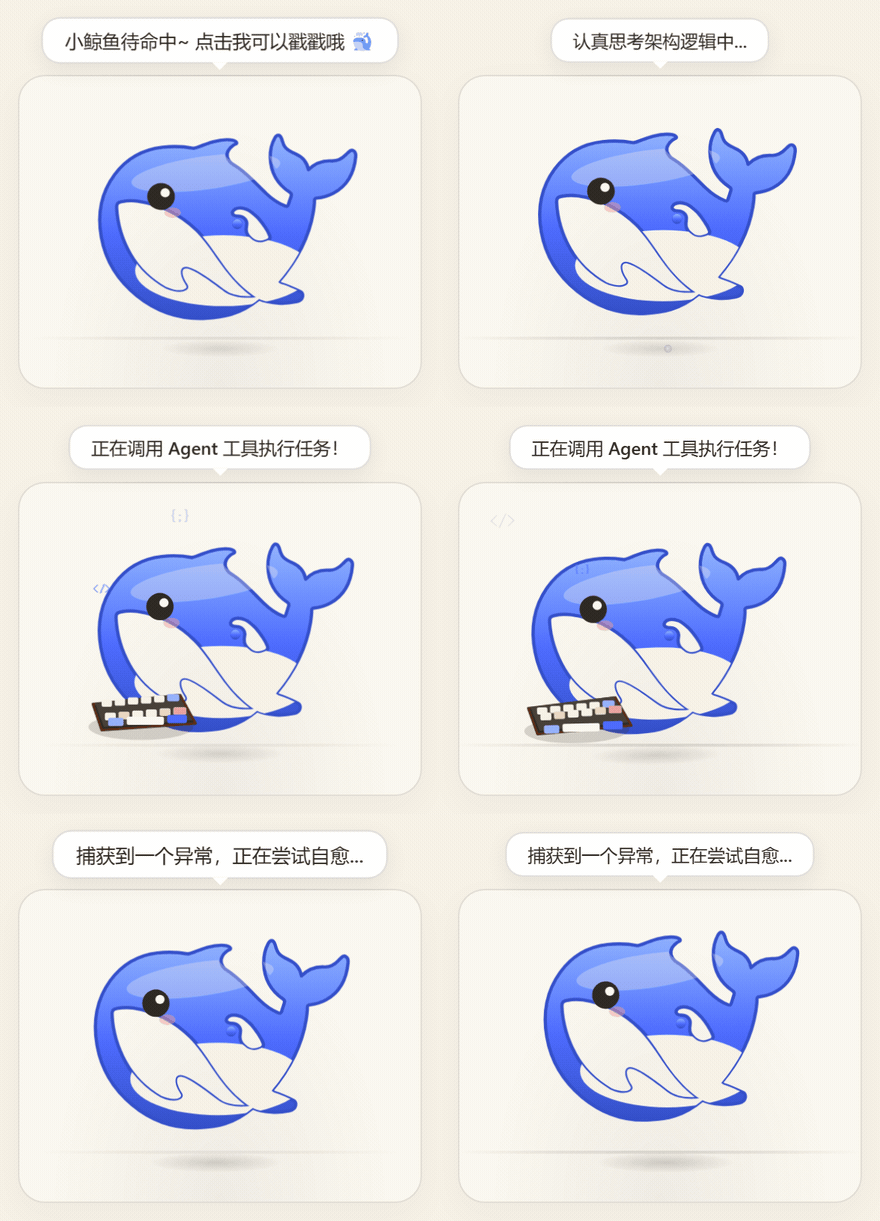
Poked until sulking → shaken dizzy → belly up → squashed → thinking → typing → multi-session badge → all done
Live preview ·
Install ·
Features ·
Community forks ·
Development
Live Preview
Open the standalone preview page to try every state and interaction:
👉 https://nzl153.github.io/dsh-pet-whale/preview.html
preview.html loads the real plugin (lib/client.js) and feeds it state from a few buttons instead of DSH; serve the repo root with any static server to run it locally.
Install
In the profile directory you are using (the desktop app and the web UI each have their own; for the web UI it is usually ~/.dsh/profiles/web), add the dependency and the bundle to package.json:
{
  "dependencies": { "pet-whale": "^1.2.6" },
  "dsh": { "profile": { "bundles": ["...existing...", "pet-whale"] } }
}
Then run pnpm install in that directory and restart DSH. For the desktop app, quit from the tray and reopen it.
Without npm:
# Local directory install (the repo already contains built lib/, no build needed)
dsh plugin --profile web add link:/path/to/pet-whale

# Or install directly from Git
dsh plugin --profile web add "github:nzl153/dsh-pet-whale#main"
Requires DSH >=0.1.5-alpha.2 <0.3.0 and Node.js ^22.19.0 || >=24.0.0. See Compatibility for how each release was checked.
Features
State & companionship
| Capability |
Description |
| State machine |
idle / think (diving) / working (swimming + typing + code particles) / celebrate (leaping + bubbles) / error (shaking + black lines) / disappointed (a brief slump after an error) / wait (waiting for your input); priority: error > celebrate > think > working > idle |
| Expressions |
The eyes follow the mood: squinted ^ when celebrating, drooping with a worried brow and a falling tear when disappointed, crosses on error, crescents when sleeping or belly up, an angry brow when sulking, >_< when grabbed |
| Turn semantics |
Never idle while a turn is running: with tools = working, without tools (text or internal reasoning) = think diving; keyboard animation sticks for 2.5s during tool-heavy phases |
| Think ticker |
While thinking, the latest reasoning text scrolls above the whale (can be toggled) |
| Follow all sessions |
DSH 0.1.7+: when the current session is idle but another one is running, the whale keeps working and a little bubble badge in front of its head shows how many are running (it rides the body’s bobbing, sways gently, and pops when the number changes); when another session finishes it celebrates and names it, and it tells you which session is waiting for confirmation. Subagents don’t count. Can be turned off under “More settings → Behavior” |
| Parallel chatter |
With follow-all on: at 2 sessions running at once (current included) it cheers about the parallel push, at 4 it starts complaining about overtime; each level is announced once, and only when a batch that really ran in parallel is fully done does it sigh “so tired… finally got every last one done” |
| Error care |
Click the whale during error state to copy the error text |
| Comforting |
Poking during the post-error disappointed state counts as comfort: a happy animation, a warm line, and the sulk ends early |
| Bond level |
Interactions, completed turns and days together all feed one score, split into three tiers: Acquainted / Close / Inseparable. The tier changes poke lines and greetings, and at Inseparable the whale occasionally speaks up on its own; it announces each promotion, and the current tier and progress show up under Companion Stats |
| Idle micro-movements |
Random swimming, looking around, and bubble blowing |
| Free swimming |
Toggle “Swim” to let the whale roam the page along cubic Bezier paths, with banking, adaptive flipping, depth dives, wake ripples, and splashes; it yields while the agent is busy, and the preference is persisted |
Interactions
| Capability |
Description |
| Basics |
Click to poke, double-click 360° flip, drag with >_< eyes, right-click quick menu, mouse-follow eyes, 20s idle sleep |
| Headpat |
No buttons needed: rub the cursor back and forth over its head and the cursor turns into a little hand. From the second stroke it squints and blushes, each stroke presses its head down a little, and every five strokes a heart floats up. Keep rubbing frantically (eight strokes in about a second) and it frowns, grumbles about going bald, swims off, and refuses pats for five seconds. Patting it while disappointed counts as comfort. The right-click “Headpat” and a 0.7s long press play the same reaction |
| Poke escalation |
Pokes 1-2 get the usual squish, 3-5 make it lean away annoyed, 6+ turn it away with an angry brow; the streak decays after 2.6s of no poking, and it drops the mood the moment the agent starts working |
| Shake dizzy |
Grab it and swing it left and right - four direction changes within a second make it dizzy: the eyes go @@, it begs you to stop, and the body keeps wobbling after you let go; hand tremor and slow back-and-forth do not count. It stays woozy for the next dozen seconds too, with a visibly crooked swim path |
| Belly up |
The double-click reaction follows your bond: normally a 360 spin, but at Inseparable it rolls over and shows you its belly |
| Edge squash |
Push it against a screen edge and it flattens: narrower against the left and right edges, a whale pancake against the top and bottom, squashing from the edge it is pressed on; in a corner only left/right counts. It springs back once you move away |
| Held too long |
Hold it in midair for over 2 seconds and it starts squirming to ask if you are still there; moving stops the nagging |
| Smart avoidance |
In idle, the whale moves aside when the cursor lingers nearby; grabbing/right-click cancels and cools down for 8s |
Reminders: finish alert, break reminder, scheduled hide
| Capability | Description |
|---|---|
| Finish alert | When a turn completes while you are on another tab, the tab title becomes "✅ Done · " and restores when you come back; an optional system notification is off by default and only asks for permission when you enable it |
| Break reminder | Set 45 / 60 / 90 minutes and the whale surfaces with a spout to nudge you; off by default, and leaving the page for over 10 minutes counts as a rest and resets the timer |
| Scheduled hide | Hide after 1 hour or every day at 22:00 |
</details>
Appearance & settings: skins, size, sound, hide/recall, languages and more
| Capability | Description |
|---|---|
| Skins | 7 built-in palettes (default Theme Blue), extensible by adding one line in `src/client/palettes.ts` |
| Custom size | Right-click - Appearance - Size cycles through Small / Standard / Large / Huge (0.8x - 1.6x). Scaling also moves the collision bounds, splash origins and edge detection, not just the visual |
| Sound | WebAudio-synthesized sounds, can be muted; "More settings → Behavior → Volume" cycles Muted / Low / Medium / High, remembered across reloads |
| Pretend work | "Pretend to work" mode keeps the typing animation on; preference is persisted |
| Hide/recall | Hide to a small 🐳 button; state persists across refresh |
| Quick menu & settings | Right-click opens a compact quick menu; "More settings" opens a grouped panel (appearance / behavior / stats) |
| Stats | The settings panel keeps running counts of completions, interactions, errors, and days spent together |
| Localization | Full Chinese and English copy, following the DSH locale service automatically; the standalone preview page detects the browser language and can be overridden manually |
| Theme sync | Follows DSH light/dark theme for bubbles, dialogs, and shadows |
| Background power saving | Animations, sounds, and the think ticker pause when the page is hidden |
| Accessibility | Respects `prefers-reduced-motion` |
## Community forks
The whale itself is maintenance-first (see [CONTRIBUTING.md](/dsh-pet-whale/CONTRIBUTING.md)). If you want more,
take a look at these forks:
- [wzwei1990/dsh-pet-whale](https://github.com/wzwei1990/dsh-pet-whale) — multi-pet architecture
(switch between the whale, a cat and Ling'er, each with its own SVG, animations and lines),
plus a `pnpm pet:doctor` health-check script
These forks are maintained independently and are not affiliated with this repository. Please read
their own documentation before using them.
## Development
### Build & Test
```sh
pnpm install
pnpm typecheck # TypeScript type check
pnpm dev # dev watch: rebuild lib/client.js on src/client changes; DSH HMR applies it automatically
pnpm build # tsdown → lib/index.mjs + lib/client.js
pnpm test # build first, then run smoke and regression tests
pnpm verify # type check, build and test, then verify the npm package as a consumer
pnpm verify:hmr # verify local repo <-> running DSH HMR wiring
```
- `src/client/palettes.ts` — palette extension point. Add one line for a new skin.
- `scripts/verify-live.mjs` — one-click live verification after restart.
- State source (dsh 0.1.5): session lifecycle comes from the `ctx.sessions` snapshot
(`running` / `lastAgentError` / `openError`); `partial` / `runningCalls` / `turnEnds` come from the
chat projection on `ctx.uiConversation` (`ChatSnapshot.legacy`). The field-by-field mapping lives at the
top of `src/client/state.ts`.
- 0.1.7 changes: the current session is the list row with `retainedBy.mainView > 0` (the list no longer has
`current`); per-session running / pending confirmation comes from `ctx.uiSession.sessionStatus` and drives the
wait state and follow-all-sessions. 0.1.5 has no `sessionStatus`, so both are simply inactive there.
- [patches/](patches/) holds early personal UI patches written for DSH rc.6. They are not part of this plugin, no longer maintained, and kept for reference only.
### Hot Reload
Prerequisite: the DSH profile installs this repo via `link:` (not a static GitHub/npm copy), and DSH `>=0.1.5-alpha.2`.
`pnpm dev` watches `src/` and rebuilds `lib/client.js` (and the host half `lib/index.mjs`).
The built-in `@deepseek-ai/dsh-client-hmr` polls for rebuilds and broadcasts through `/plugins/events`;
the browser invalidates and reloads this plugin automatically. **Client-only changes do not require a DSH restart or a page refresh.**
- Hot-reloadable: `src/client/**` UI, styles, state machine, interactions.
- Still requires a DSH restart:
- changes to `package.json` `dsh.client` / `dsh.bundle` / `exports` structure
- `cordis.patch.yml` or host half `src/index.mjs` composition changes
- installing/uninstalling dependencies, upgrading DSH, changing the profile bundle list
- Verify wiring with DSH running: `pnpm verify:hmr`.
### Compatibility
Supports DSH 0.1.5 – 0.2.0; 0.2.0-rc.2, 0.2.0-rc.1, 0.1.7-rc.2 and 0.1.5-rc.2 were run on a real host. Expand for the basis of each release
| DSH release | Status | Basis |
|---|---|---|
| `0.2.0-rc.2` | compatible | Ran on a real host (official desktop app): the whale switches states normally during a tool call. npm type comparison: the only differences from rc.1 are in the official duration labels and running icon; the session list, session snapshot, chat projection and `sessionStatus` this plugin reads are unchanged |
| `0.2.0-rc.1` | compatible | Ran on a real host (official desktop app): tool call `idle → working → celebrate → idle` all fired. The session list, session snapshot, chat projection and `sessionStatus` types this plugin reads are the same as 0.1.7-rc.2 |
| `0.1.7-rc.2` | compatible | Ran on a real host: tool call `idle → think → working`; switching to another session mid-turn shows badge 1 without a false celebrate; when the background session finishes it celebrates, names the session, and falls back after 2.5s; zero console errors. Also in daily use on the official desktop app preview |
| `0.1.7-rc.1` | compatible | Not run. npm type comparison: the only differences from rc.2 are in the model-catalog interfaces; the session list, session snapshot, chat projection and `sessionStatus` this plugin reads are unchanged |
| `0.1.5-rc.3` | compatible | Not run. Only pins dependency versions relative to rc.2 |
| `0.1.5-rc.2` | compatible | Ran on a real host: new session, tool call, plain-text turn — zero console errors, `idle → think → working → celebrate → idle` all fired, and celebrate self-expires back to idle after 2.5s (no next message needed to unstick it) |
| `0.1.5-rc.1` | compatible | Not run. Per-file npm comparison: `dsh-api-session-controller`, `dsh-client-ui-conversation`, `dsh-client-locale`, `dsh-client-modules`, `dsh-cordis-client-runner` are **byte-identical** to rc.2; `dsh-client-ui-chat` differs only by a 15-character CSS tweak unrelated to the `legacy` projection this plugin reads |
| `0.1.5-alpha.2` | compatible | Not run. Same as above; the only difference is a doc-string line number (`contract.ts:23` → `:24`) in `dsh-cordis-client-runner` |
The previous 1.1.0 threw `TypeError: Cannot read properties of undefined (reading 'length')` on every session-snapshot
update under 0.1.5. The field-by-field mapping and the fix are documented at the top of `src/client/state.ts`.
1.1.2 doesn't throw under 0.1.7 but stays idle forever: 0.1.7 removed `current` from the session list, so the plugin
couldn't find the current session. Since 1.1.3 it uses the session held by the main view.
## License
[MIT](/dsh-pet-whale/LICENSE)